MockFast: Intercept and Mock API Responses Directly in Chrome
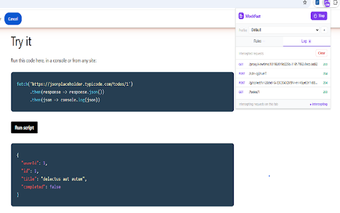
MockFast - API Mock & Response Interceptor, created by an experienced backend engineer, is a Chrome extension that intercepts HTTP requests and serves mock responses inside the browser. It uses the Chrome Debugger API to capture XHR and Fetch calls without proxy setup, enabling custom bodies, headers, status overrides, latency simulation, and request redirection. Frontend developers, QA engineers, and testers use it to continue UI work and validate error handling when backend services are unavailable.
What is MockFast used for?
The extension is a browser-side mock and response interceptor that uses the Chrome Debugger API to capture XHR and Fetch calls. With zero-configuration activation it applies rules without source changes or external proxy software. You can replace response bodies with JSON, HTML, or plain text, override HTTP status codes and headers, or redirect requests to alternate URLs. That makes it practical for simulating missing backends and testing error paths directly in the browser.
How does MockFast affect development performance and local testing?
MockFast's local-first interception minimizes setup and keeps traffic in the browser, which reduces reliance on external proxies and preserves local privacy. A live request log displays intercepted and passing traffic in real time, helping trace which rules applied. The extension can inject artificial latency, timeouts, and connection errors to reproduce slow-network behavior, and it lets you redirect production calls to localhost so local servers can be tested against real domains.
Can MockFast manage multiple environments and complex test cases?
The extension organizes behavior with a profile system so teams can switch rule sets for Dev, Staging, or Demo scenarios. A built-in template library provides one-click starting points for common cases like login success and paginated lists, while the rule engine supports conditional and redirect rules. MockFast runs on Chrome and other Chromium-based browsers, and the developer's backend-for-configurations stack uses Java Spring Boot and React to manage mock definitions and profiles.
Practical choice for browser-based mocking with a clear trade-off
MockFast suits frontend developers and QA who must keep UI work moving when backend services lag. The primary trade-off is the free tier limit of five mock rules and a single profile, which constrains large test suites. As a workflow tip, consolidate recurring scenarios before wide deployment. For extensive test matrices, plan for an advanced tier or centralized rule management.